

Structure Snippets - FrameMaker Plugin
Structure Snippets is a plugin developed for FrameMaker 7.0 and above, and was designed to be used with structured documents. This plugin lets you save "snippets" of structured content that can be inserted easily as needed. One common use of a structure snippet is as a template for frequently used content. Snippets can be stored in a "Local" folder as well as in a "Remote" location on a shared server. This lets people define snippets that are only available for their personal use in addition to having the ability to provide snippets that can be used by a group of writers. Snippets can be inserted by selecting the entry name from a dialog box, or they can be inserted by issuing the specified shortcut keystrokes or selecting the name from the context (right-click or popup) menu.
Snippets can also be added to documents through a snippet script. A snippet script can add multiple snippets to a document by matching on element and attribute names. A snippet script can be run interactively on a document or book, or it can be run programmatically through a "CallClient" API from ExtendScript, FrameScript, of an FDK client. Using this feature, DITA-FMx can make use of Structure Snippets to perform "book-build" formatting in the DITA Map to Book processing.
Features
The Structure Snippets plugin provides the following commands ..
- Insert Snippet
- Add a predefined snippet to your document.
- Save Snippet
- Save the selected structured content to a reusable snippet file.
- Manage Snippets
- Modify and delete Local snippets with the Manage Local Snippets dialog.
- Run Snippet Script
- Runs a snippet script on the current document or book.
- Preferences
- Set preferences for the Structure Snippets plugin.
The StructureSnippets documentation is available online at : docs.leximation.com/structuresnippets.
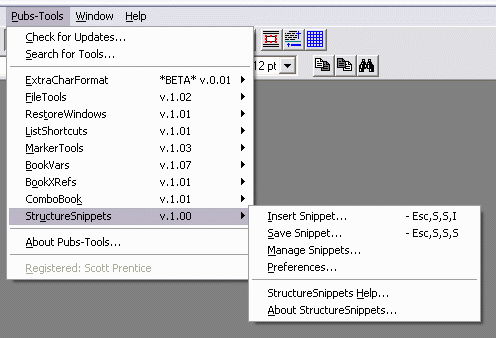
Structure Snippets menu
Buy StructureSnippets v.1.05 (Windows;
- [Add to cart] Individual License - $55.00
- [Add to cart] Site License (up to 25 users) - $825.00
- Download StructureSnippets [907 KB] - Try before you buy!
» Structure Snippets Revision History